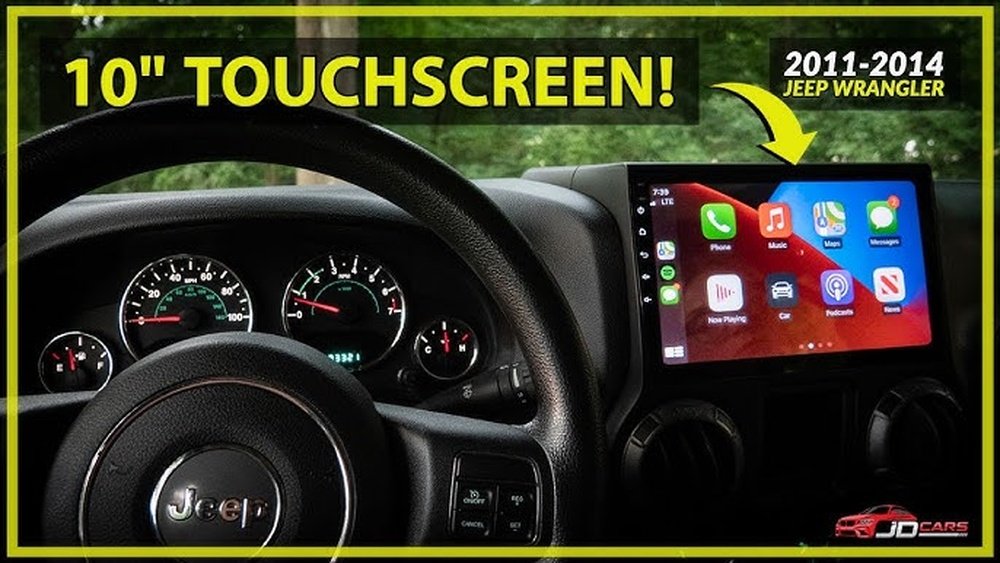
If you own an older Jeep Wrangler, you might feel like your dashboard is stuck in the past. But what if you could bring modern technology into your ride without buying a new car?
Adding Apple CarPlay to your Jeep Wrangler can make your drives safer, easier, and way more fun. Imagine using your favorite apps, maps, and music right from your dashboard screen. This guide will walk you through simple steps to upgrade your Wrangler and enjoy all the benefits of Apple CarPlay.
Ready to transform your driving experience? Keep reading—you’re about to discover how easy it is to connect your Jeep to the digital world.
Credit: www.sanantoniododgechryslerjeepram.com
Benefits Of Apple Carplay
Adding Apple CarPlay to an old Jeep Wrangler offers many useful benefits. It brings modern technology into an older vehicle. Drivers enjoy easier access to apps, music, and navigation. The system helps keep focus on the road, making drives safer and more fun.
Enhanced Connectivity
Apple CarPlay connects your iPhone directly to your Jeep’s display. This lets you use maps, calls, and messages through the car’s screen. It works with many apps you already know. No need to handle your phone while driving.
Improved Safety
CarPlay helps you stay safe by minimizing distractions. Voice commands let you control apps without taking your eyes off the road. The interface is designed for quick, simple use while driving. Calls and texts can be managed hands-free.
User-friendly Interface
The CarPlay screen is clear and easy to read. Large icons make navigation simple, even on bumpy roads. The system responds quickly to touch and voice. Anyone can learn to use it fast, making drives less stressful.
Choosing The Right Head Unit
Choosing the right head unit is key to adding Apple CarPlay to your old Jeep Wrangler. The head unit controls the display and connects your phone to your car’s system. It also affects the sound quality and ease of use. Picking the right one makes your driving safer and more fun.
Compatibility With Jeep Wrangler
Not all head units fit every Jeep Wrangler model. Check the size and shape of your current dash space. Make sure the unit supports your Wrangler’s wiring and connectors. Some models need special adapters or mounting kits. Confirm the head unit supports your Wrangler’s year and trim for a smooth install.
Key Features To Look For
Choose a head unit with Apple CarPlay support. Look for a clear, bright touchscreen that works well in sunlight. Check if it has Bluetooth for hands-free calls and music. Audio controls on the steering wheel help keep your focus on driving. Extra features like GPS and voice control add convenience.
Top Brands And Models
Pioneer, Kenwood, and Alpine make reliable CarPlay head units. Pioneer AVH-W4500NEX offers wireless CarPlay and great sound. Kenwood Excelon DMX907S has a sharp screen and strong features. Alpine iLX-W650 fits well and is easy to use. These brands provide good support and long-lasting products.
Required Tools And Materials
Adding Apple CarPlay to an old Jeep Wrangler needs some tools and materials. Preparing them before starting the job makes the process smooth. This section lists the basic tools and some optional accessories.
Basic Tools Checklist
- Phillips screwdriver for screws
- Flathead screwdriver for prying panels
- Wire strippers to prepare cables
- Crimping tool for secure wire connections
- Electrical tape to insulate wires
- Panel removal tool to avoid damage
- Socket wrench set for bolts
- Multimeter to test electrical connections
Optional Accessories
- Backup camera for better safety
- Steering wheel control adapter for convenience
- Bluetooth microphone for clear calls
- USB extension cables for easy charging
- Dash kit for a clean installation look
- Sound deadening materials to reduce noise
Preparing Your Jeep Wrangler
Preparing your Jeep Wrangler for Apple CarPlay installation is an important first step. It ensures a smooth and safe upgrade process. Taking time to prepare your vehicle will help avoid mistakes and damage. Follow these steps carefully before starting the installation.
Disconnecting The Battery
Start by disconnecting the Jeep’s battery. This prevents electrical shorts and protects the car’s electronics. Use a wrench to loosen the negative terminal first. Remove the cable and secure it away from the battery. Never touch both terminals at the same time. This simple safety step is crucial for your protection.
Removing The Old Head Unit
Next, remove the old head unit from the dashboard. Use a panel removal tool to gently pry off the trim around the stereo. Unscrew any mounting bolts holding the unit in place. Carefully pull the head unit out and disconnect the wiring harnesses. Keep all screws and parts safe for later use. Take your time to avoid breaking clips or wires.
Cleaning The Dashboard Area
After removing the old stereo, clean the dashboard area well. Dust and dirt can affect the new unit’s fit and finish. Use a soft cloth and mild cleaner to wipe the space. Remove any sticky residue or debris. This step helps the new Apple CarPlay system install smoothly and look neat.
Installing The New Head Unit
Installing a new head unit in your old Jeep Wrangler brings Apple CarPlay to life. This step updates your vehicle’s tech and enhances your driving experience. The process involves careful wiring, mounting, and securing the dashboard for a clean, professional look.
Wiring Connections
Start by disconnecting the battery to avoid any electrical issues. Match the wires from the new head unit to the Jeep’s wiring harness. Use a wiring adapter for a smooth connection without cutting factory wires. Connect power, ground, speaker, and antenna wires carefully. Double-check each connection to ensure proper function.
Mounting The Unit
Remove the old head unit by loosening screws and pulling it out gently. Slide the new head unit into the mounting bracket. Align the screw holes to secure the unit firmly. Avoid forcing the unit, as it can damage the dashboard or wiring. The new head unit should fit snugly and sit flush with the dash.
Securing The Dashboard
Replace any dashboard panels removed during installation. Secure the panels tightly to avoid rattling or gaps. Check all clips and screws to ensure the dashboard is stable. Test the head unit’s functions before fully reassembling. A well-secured dashboard keeps your Jeep looking neat and professional.
Credit: www.reddit.com
Setting Up Apple Carplay
Setting up Apple CarPlay in your old Jeep Wrangler is simple. It brings modern tech to your classic ride. The process starts with pairing your iPhone. Then, customize the settings to fit your needs. You might face some issues, but they have easy fixes. Follow these steps to enjoy CarPlay quickly.
Pairing Your Iphone
Turn on your Jeep’s ignition and head unit. Connect your iPhone using a Lightning cable. The screen should show the CarPlay icon. Tap it to start pairing. On your iPhone, a prompt will ask to allow CarPlay. Tap “Allow” to complete the connection. Your phone and Jeep are now linked.
Customizing Carplay Settings
Open the “Settings” app on your iPhone. Scroll down to “General” and tap “CarPlay.” Select your Jeep from the list. You can rearrange app icons by dragging them. Hide apps you don’t use to keep the screen clean. Adjust settings like “Do Not Disturb While Driving” for safety. Personalize CarPlay to suit your driving style.
Troubleshooting Common Issues
CarPlay not showing? Check if your iPhone is unlocked. Make sure the cable is Apple-certified and properly connected. Restart your iPhone and Jeep’s head unit if needed. Update your iPhone to the latest iOS version. If problems persist, reset CarPlay settings on your iPhone. These tips solve most connection problems quickly.
Additional Upgrades For Jeep Wrangler
Adding Apple CarPlay to your old Jeep Wrangler is a great start. You can also improve your driving experience with extra upgrades. These upgrades make your Jeep more modern and fun to drive. They help with sound, safety, and ease of use.
Here are some key upgrades to consider for your Jeep Wrangler.
Upgrading Speakers
Old Jeep speakers may not deliver clear sound. New speakers can improve music quality and volume. Choose speakers made for Jeep models for easy fitting. Good speakers make driving more enjoyable. Clear sound helps when using Apple CarPlay for calls or navigation.
Adding Backup Cameras
Backup cameras add safety by showing what is behind your Jeep. They help avoid accidents when reversing. Many modern head units support backup camera inputs. You can install a camera on the rear bumper or license plate area. This upgrade is useful for off-road and city driving.
Integrating Voice Control
Voice control lets you keep your hands on the wheel. You can control music, calls, and navigation by speaking. Some Apple CarPlay units include built-in voice assistants. This feature makes driving safer and more convenient. It works well with noisy Jeep cabins.
Maintenance And Tips
Maintaining your Apple CarPlay system in an old Jeep Wrangler ensures it works well for years. Regular care keeps the head unit safe and the software current. Small habits help you enjoy smooth rides with smart tech.
Software Updates
Keep your CarPlay software updated. Updates fix bugs and add new features. Check for updates through your iPhone or the head unit settings. Install updates promptly to avoid glitches or slowdowns.
Protecting Your Head Unit
Avoid direct sunlight on the screen to prevent damage. Use a screen protector to guard against scratches. Clean the screen gently with a soft cloth. Do not use harsh chemicals or water.
Maximizing Battery Life
Turn off CarPlay when not in use to save battery. Use a quality USB cable for charging. Avoid charging your phone with the engine off for long periods. Keep the battery healthy for longer drives.

Credit: www.youtube.com
Frequently Asked Questions
What Is Apple Carplay Compatibility For Jeep Wranglers?
Apple CarPlay compatibility depends on your Jeep Wrangler’s model year and factory head unit. Older Wranglers typically lack built-in support, so aftermarket systems are necessary to add CarPlay functionality.
Can I Install Apple Carplay Myself In A Jeep Wrangler?
Yes, you can install Apple CarPlay yourself if you have basic tools and technical skills. Many aftermarket head units come with detailed instructions for DIY installation.
Which Aftermarket Head Units Support Apple Carplay In Wranglers?
Popular brands like Pioneer, Kenwood, and Alpine offer head units with Apple CarPlay support. Choose models compatible with your Wrangler’s dashboard and wiring for seamless integration.
Does Adding Apple Carplay Affect Jeep Wrangler’s Original Features?
Proper installation of Apple CarPlay usually preserves your Jeep Wrangler’s original features. Some wiring adapters ensure that steering wheel controls and backup cameras continue working.
Conclusion
Adding Apple CarPlay to your old Jeep Wrangler is easier than it seems. Choose the right kit and follow the steps carefully. This upgrade brings modern features to your classic ride. Enjoy safer driving with hands-free calls and navigation. Keep your Wrangler feeling fresh and connected.
Small changes can make a big difference on the road. Now, your Jeep matches today’s technology without losing its charm. Give your vehicle a smart update that fits your style.