If you own a Jeep Grand Cherokee, knowing how to use an OBD2 scanner can save you time and money. Imagine catching car problems before they become expensive repairs.
With a simple tool and a few easy steps, you can unlock important information about your vehicle’s health. This guide will walk you through using an OBD2 scanner on your Jeep Grand Cherokee, so you can take control of your car’s maintenance and drive with confidence.
Ready to become your own car expert? Let’s dive in.
Credit: www.klavkarr.com
Choosing The Right Obd2 Scanner
Choosing the right OBD2 scanner for your Jeep Grand Cherokee is important. It helps you check the car’s health and find problems fast. The right tool saves time and money. It also gives clear information you can trust.
Types Of Obd2 Scanners
There are several types of OBD2 scanners. Basic code readers show error codes and clear them. Advanced scanners give detailed data and live readings. Bluetooth scanners connect to your phone or tablet. Handheld devices are easy to use and carry. Choose a type that fits your needs and skills.
Features To Look For
Look for features like easy-to-read screens. A scanner with live data display helps track car functions. Freeze frame data shows conditions when a problem occurred. Some scanners include repair tips. Multilingual support can help non-native English speakers. Battery life and update options matter too.
Compatibility With Jeep Grand Cherokee
Make sure the scanner works with Jeep Grand Cherokee models. Some scanners support only newer vehicles. Check the year and engine type compatibility. Confirm it supports all OBD2 protocols used by Jeep. This ensures accurate readings and full access to your car’s system.

Credit: obd2australia.com.au
Locating The Obd2 Port In Jeep Grand Cherokee
Finding the OBD2 port in your Jeep Grand Cherokee is the first step to using an OBD2 scanner. This port connects the scanner to your vehicle’s computer. It lets you read error codes and monitor your Jeep’s health quickly. Knowing where this port is saves time and effort.
Common Port Locations
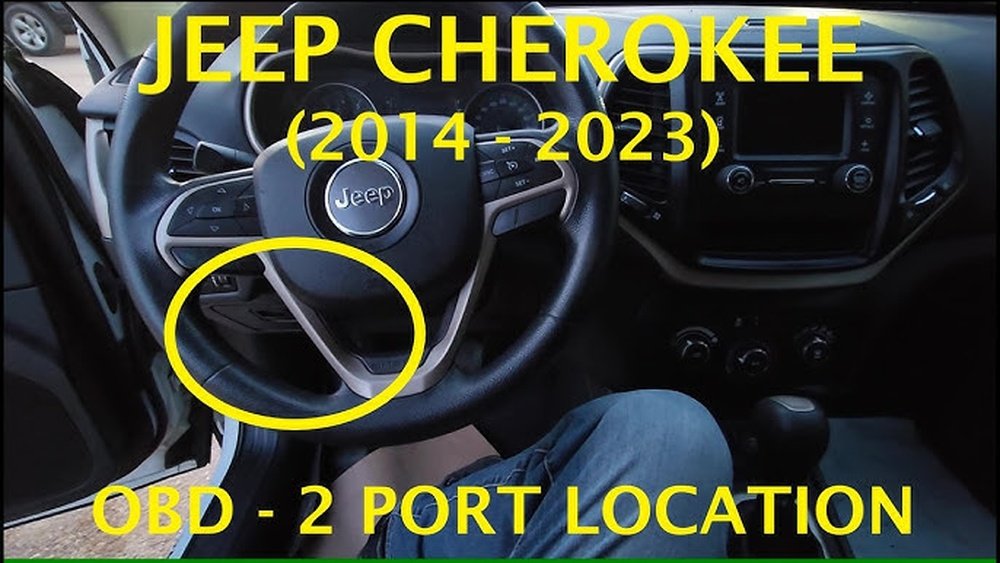
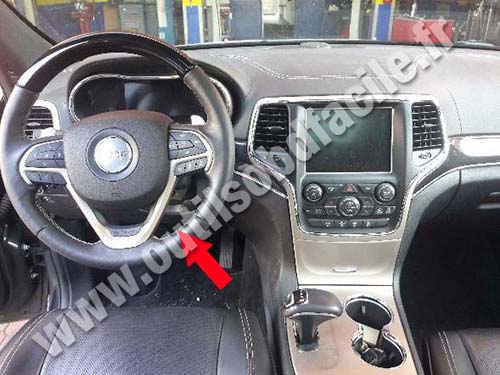
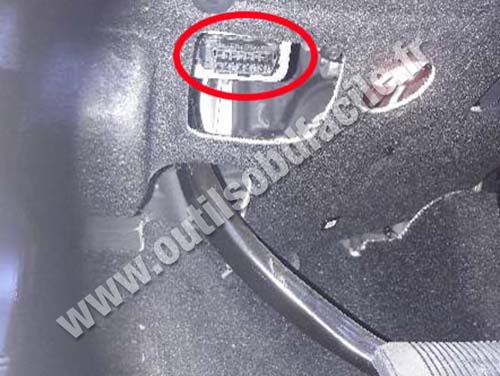
The OBD2 port in the Jeep Grand Cherokee usually sits under the dashboard. Look near the steering column or above the pedals. Sometimes, it hides close to the center console or below the glove box. The port is a small, trapezoid-shaped connector.
In most models, it stays within easy reach from the driver’s seat. The port will not require tools to access. It is designed for quick connection of diagnostic devices.
Access Tips
Check under the dashboard with a flashlight to spot the port easily. Move the driver’s seat back slightly for better access. Clear any loose items or floor mats blocking your view.
Use your hand to feel around if you cannot see the port. It should be near the steering wheel’s base or center console. Avoid pulling or forcing anything to prevent damage.
Preparing Your Vehicle And Scanner
Preparing your Jeep Grand Cherokee and OBD2 scanner is the first step for a smooth scan. This preparation helps avoid errors and saves time. Follow simple steps to get ready before connecting the scanner.
Proper preparation ensures the scanner works correctly and reads accurate data. It also protects your vehicle’s electronic system from damage.
Turning Off The Engine
Always turn off your Jeep’s engine before plugging in the scanner. This stops any electrical issues during connection. Make sure all lights and accessories are off. The vehicle should be in park or neutral with the handbrake on. This keeps everything safe while you connect the scanner.
Connecting The Scanner Properly
Locate the OBD2 port under the dashboard, near the steering wheel. It is a 16-pin connector and easy to spot. Plug the scanner firmly into the port. Do not force it if it does not fit. Check the scanner’s power light to confirm connection. Some scanners power on only after connection. Follow the scanner instructions for any extra steps.
Reading Diagnostic Codes
Reading diagnostic codes is the key step in using an OBD2 scanner on your Jeep Grand Cherokee. These codes help identify issues with the vehicle’s engine, transmission, and other systems. Understanding these codes saves time and money on repairs. It also gives a clear picture of your Jeep’s health.
Starting The Scanner
First, locate the OBD2 port under the dashboard on the driver’s side. Plug the scanner connector into this port firmly. Turn the Jeep’s ignition to the “On” position without starting the engine. Power on the scanner. Wait for it to connect to the vehicle’s computer. Follow the scanner’s on-screen instructions to begin reading codes.
Interpreting Code Results
The scanner displays codes in a letter and number format, like P0301. Each code points to a specific problem area. Use the scanner’s manual or app to find code definitions. Common codes may relate to engine misfires, oxygen sensors, or fuel systems. Note the codes carefully for repair or further diagnosis. Some scanners show live data, which helps understand ongoing issues.
Clearing Trouble Codes
Clearing trouble codes is a key step after diagnosing your Jeep Grand Cherokee. These codes show what issues your vehicle has. Clearing them helps reset the system and turn off the check engine light.
Sometimes codes stay even after fixing the problem. Clearing them helps see if the fix worked. It also keeps your dashboard clean from old warnings.
Steps To Clear Codes
First, plug the OBD2 scanner into the Jeep’s port under the dashboard. Turn the ignition to the “On” position without starting the engine. Power on the scanner and wait for it to connect.
Next, select “Read Codes” to see stored trouble codes. Note them down if needed. Then, choose the “Clear Codes” or “Erase Codes” option. Confirm your choice to remove the codes.
Wait for the scanner to finish. Turn off the ignition and unplug the scanner. Start the engine to check if the warning light is off.
When To Clear And When Not To
Clear codes only after fixing the problem. Erasing codes without repairs hides the issue temporarily. The check engine light will likely come back.
Do not clear codes during active engine problems. This may prevent proper diagnosis. Wait until you fix the cause before erasing codes.
Clear codes after repairs to reset the system. This helps your Jeep run smoothly and the scanner give accurate readings.
Using Advanced Scanner Features
Using advanced features of an OBD2 scanner can give deeper insights into your Jeep Grand Cherokee’s health. These features help you see real-time data, check past issues, and learn more about your vehicle. Understanding these tools lets you diagnose problems quickly and keep your car running smoothly.
Live Data Monitoring
Live data monitoring shows real-time information from your Jeep’s sensors. You can watch engine speed, coolant temperature, and fuel system status. This data helps spot problems as they happen. It also shows how your engine performs while driving.
Freeze Frame Data
Freeze frame data captures vehicle conditions when a fault occurs. It stores values like speed, engine load, and temperature at the time of trouble. This snapshot helps find the cause of an error code. It is useful to understand what triggered a warning light.
Vehicle Information Access
The scanner can read important vehicle details like VIN, calibration IDs, and more. This information helps verify your Jeep’s parts and software versions. It also assists mechanics in finding the right repair information. Accessing this data makes diagnosis easier and faster.
Troubleshooting Common Issues
Using an OBD2 scanner on your Jeep Grand Cherokee can help find car problems fast. Sometimes, the scanner may not work as expected. Knowing how to fix common issues can save time and stress. Below are key problems and easy solutions to try.
Scanner Not Connecting
First, check the scanner is plugged into the right port. The OBD2 port is usually under the dashboard. Make sure the car ignition is on, but the engine is off. Try restarting both the scanner and the vehicle. Clean the port if dirt blocks the connection. If it still won’t connect, test the scanner on another car to rule out device issues.
Inaccurate Codes
Sometimes, the scanner shows wrong or old codes. Clear the codes and scan again after a short drive. Make sure the scanner software is updated to the latest version. Faulty sensors in the vehicle can cause wrong codes. If codes don’t match symptoms, consult a mechanic for a deeper check.
Power Supply Problems
The scanner needs power from the vehicle to work. Check the car battery charge and voltage. Loose or corroded battery terminals can affect power. Use a different OBD2 scanner to see if the problem is with your device. Avoid using the scanner if the car’s electrical system is unstable.
Credit: www.klavkarr.com
Maintaining Your Obd2 Scanner
Maintaining your OBD2 scanner is key for accurate vehicle diagnostics. A well-kept scanner works better and lasts longer. It helps you catch Jeep Grand Cherokee issues early. Regular care saves money and stress. Follow simple steps to keep your tool ready.
Software Updates
Keep your scanner’s software up to date. Updates improve accuracy and add new features. They fix bugs and support newer Jeep models. Check for updates often on the manufacturer’s website. Connect the scanner to your computer or phone for easy updating. Do not skip updates to avoid wrong readings.
Proper Storage
Store the OBD2 scanner in a dry, cool place. Avoid extreme heat or cold. Protect it from dust and moisture. Use a case or pouch to prevent damage. Keep cables untangled and safe. Proper storage stops wear and tear. This ensures your scanner works well every time.
Frequently Asked Questions
What Is An Obd2 Scanner For Jeep Grand Cherokee?
An OBD2 scanner reads diagnostic codes from your Jeep’s computer. It helps identify engine and system issues quickly. This tool is essential for DIY maintenance and troubleshooting.
How Do I Connect An Obd2 Scanner To Jeep Grand Cherokee?
Locate the OBD2 port under the dashboard. Plug the scanner into the port securely. Turn on your Jeep’s ignition to power the scanner and start diagnostics.
Can Obd2 Scanner Fix Jeep Grand Cherokee Problems?
No, the scanner only detects and displays error codes. It helps you understand issues but doesn’t repair them. Use the codes to guide repairs or inform your mechanic.
Which Obd2 Scanner Works Best For Jeep Grand Cherokee?
Choose a scanner compatible with Jeep’s protocols like CAN and ISO 15765. Popular brands include BlueDriver and Autel. Ensure it supports live data and code clearing for best results.
Conclusion
Using an OBD2 scanner on your Jeep Grand Cherokee saves time and money. It helps you find car problems quickly. You can read error codes and understand what they mean. This tool guides you to fix issues or tell a mechanic exactly what’s wrong.
Regular use keeps your vehicle in good shape. It’s simple and useful for every Jeep owner. Keep your scanner handy for easy car care. Taking small steps helps avoid big repair costs later. Try it yourself and feel more confident with your Jeep.