Is your Uconnect screen suddenly gone black while you’re driving your Jeep? It’s frustrating, isn’t it?
You rely on that screen for navigation, music, and important controls, and when it stops working, it feels like everything grinds to a halt. But don’t worry—fixing a black Uconnect screen is easier than you think. You’ll discover simple, effective tips to bring your screen back to life quickly.
Keep reading, and you’ll be back on the road with your Jeep’s system working perfectly in no time.
Common Causes Of Uconnect Screen Blackout
The Uconnect screen blackout is a common problem Jeep owners face. Understanding the main causes helps to fix it quickly. Several factors can make the screen go black. Some are easy to solve, while others need more attention. Below are the common causes that lead to this issue.
Power Supply Issues
The Uconnect screen needs steady power to work. A loose or damaged fuse can cut the power supply. Faulty wiring may also stop power from reaching the screen. Battery problems can cause voltage drops, affecting the screen. Check the power connections and fuses first.
Software Glitches
Software bugs can cause the screen to freeze or go black. Outdated software may conflict with the system. Sometimes the system needs a simple reset to fix errors. Regular updates keep the software running smoothly. Restarting the Uconnect system often clears glitches.
Hardware Failures
Physical damage to the screen or internal parts can cause blackouts. A broken display or loose cable inside the unit stops the image. Water damage or wear and tear may also harm hardware. Repair or replacement might be necessary if hardware fails.
Connectivity Problems
Uconnect relies on connections to other car systems. Poor connections can make the screen stop working. Faulty antennas or damaged cables disrupt communication. Bluetooth or USB issues might cause the screen to go dark. Inspecting cables and connections can solve this problem.
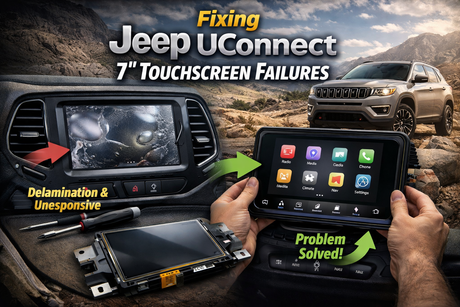
Credit: www.cuescreens.com
Simple Steps To Reset Uconnect System
Resetting your Uconnect system can solve many common issues quickly. A black screen on your Jeep’s Uconnect is often fixed by a simple reset. These steps do not require special tools or skills. Follow these easy methods to get your system working again fast.
Soft Reset Method
Start with a soft reset for minor problems. Press and hold the volume knob and the tune/scroll knob at the same time. Keep holding them for about 10 seconds. The Uconnect screen will turn off and reboot. This clears temporary glitches without affecting your settings.
Hard Reset Procedure
A hard reset helps if the soft reset does not work. Turn off your Jeep and open the driver’s door. Wait for one minute to let the system power down. Close the door and restart the vehicle. This method resets more parts of the system and can fix deeper issues.
Using Fuse Box Reset
Use this reset only if other methods fail. Find the fuse box under the dashboard or in the engine bay. Locate the fuse for the Uconnect system using your Jeep’s manual. Remove the fuse carefully and wait 30 seconds. Put the fuse back and start your Jeep. This cuts power to the system and forces a full reboot.
Updating Uconnect Software
Updating the Uconnect software is a key step to fix a black screen on your Jeep’s system. The software controls many functions, including the display and touch response. Keeping it updated can solve bugs that cause the screen to go black. This process is simple and can often restore the system’s full function quickly.
Checking For Updates
Start by checking if your Uconnect system needs an update. Turn on your Jeep and access the Uconnect main menu. Navigate to the settings or system information section. Look for the software update option. This will tell you if there is a new version available for your system. You may need to connect to Wi-Fi or use a USB drive depending on your model.
Downloading And Installing Updates
If an update is available, download it using your home Wi-Fi or a mobile hotspot. Some updates require a USB drive with enough free space. Visit the official Uconnect website on your computer to download the update file. Transfer it to the USB drive, then plug it into your Jeep’s USB port. Follow the on-screen instructions to install the update. Do not turn off the vehicle during installation.
Benefits Of Software Updates
Software updates improve system stability and fix bugs. They can prevent the black screen issue from happening again. Updates also add new features and improve existing ones. Your Uconnect system will run smoother and respond faster. Regular updates keep your Jeep’s technology working well and up to date.
Inspecting Hardware Components
Inspecting the hardware components of your Jeep’s Uconnect screen is a key step in fixing a black screen issue. The problem could be with the screen connection, the display itself, or other hardware parts. Careful inspection helps find the root cause. This saves time and avoids unnecessary repairs.
Check the physical parts first. Loose or damaged connections often cause the screen to go black. You can fix many problems by tightening or reseating cables. Understanding when a part is faulty or needs replacement is crucial for effective repair.
Screen Connection Checks
Start by turning off the vehicle and disconnecting the battery. Remove the trim around the Uconnect screen carefully. Look for any loose or disconnected cables behind the screen. Gently press each connector to make sure it is fully plugged in. Check for dirt or corrosion on the connectors. Clean them with a soft cloth if needed. Also, inspect the cables for any visible damage or wear. Damaged cables can interrupt the signal to the screen.
Diagnosing Faulty Display
If the connections look fine, the screen itself might be faulty. Turn the Uconnect system on and watch for any faint light or images. A completely black screen with no backlight means the display could be dead. Try adjusting the brightness settings. No change suggests a hardware issue. You can test the screen by connecting it to another compatible system if possible. This confirms whether the screen works or not.
When To Replace Hardware
Replace hardware only after confirming a fault. If cables and connectors are intact, and the screen shows no signs of life, replacement is needed. Damaged screens cannot be fixed by simple resets. Also, replace any cables that appear worn or broken. Using original or high-quality parts ensures the Uconnect system works correctly. Installing new hardware may require professional help for proper fit and function.
Tips To Prevent Future Uconnect Issues
Keeping your Uconnect screen working well means avoiding problems before they start. Simple steps can protect the system and keep it running smoothly. These tips help you enjoy your Jeep’s technology without interruptions.
Regular System Maintenance
Check for software updates often. Updates fix bugs and add improvements. Clean the screen gently with a soft cloth. Avoid harsh chemicals that can damage the display. Restart the system occasionally to clear minor errors. These small actions keep the Uconnect system healthy.
Safe Usage Practices
Do not force buttons or touch the screen too hard. Avoid using the system in very hot or cold weather. Keep liquids away to prevent spills on the screen. Use only recommended accessories and cables. Handle the system with care to prevent damage.
Professional Servicing Recommendations
Have your Uconnect system checked by a Jeep technician yearly. Seek help from professionals if the screen acts strange or stops working. Avoid trying to fix complex issues yourself. Certified technicians have the tools and knowledge to solve problems safely.
Credit: www.samlemanpeoria.com
When To Seek Professional Help
Sometimes fixing your Uconnect screen on a Jeep needs expert care. Simple tricks may not solve all problems. Knowing when to ask for help can save time and money. It also prevents more damage to your vehicle’s system.
Identifying Complex Problems
Some issues look easy but hide deeper faults. For example, a black screen might mean a wiring problem. Or the system’s software could be corrupted. If basic resets and checks fail, it means a complex issue exists. These problems require special tools and skills. Trying to fix them alone might cause more harm.
Authorized Service Centers
Choose authorized Jeep service centers for repairs. They have trained technicians who know Uconnect systems well. They use genuine parts that fit perfectly. These centers follow Jeep’s repair standards. This ensures your system works like new after service. Plus, they can diagnose hidden faults accurately.
Warranty And Repair Options
Check if your Jeep or Uconnect system is under warranty. Some repairs may be free or low cost. Warranty covers defects and some malfunctions. Authorized centers handle warranty claims smoothly. They offer repair or replacement options based on the problem. Using warranty saves money and guarantees quality work.

Credit: www.jackpowell.com
Frequently Asked Questions
Why Is My Jeep Uconnect Screen Black?
A black Uconnect screen often indicates a software glitch or power issue. Restart your vehicle and system first. If it persists, check the fuse or seek professional help to avoid further damage.
How Do I Reset A Black Uconnect Screen?
To reset, press and hold the volume and tuner knobs simultaneously for about 10 seconds. The system should reboot and resolve minor software glitches causing the black screen.
Can A Battery Issue Cause Uconnect Screen Blackout?
Yes, a weak or dead battery can cause the Uconnect screen to go black. Ensure your battery is charged and connections are secure to avoid display problems.
Should I Update Uconnect Software To Fix Black Screen?
Updating Uconnect software can fix bugs causing black screens. Visit Jeep’s official website for updates or use a USB drive to install the latest software version.
Conclusion
Fixing a black Uconnect screen on your Jeep can be simple. Start with basic checks like restarting the system or checking connections. Small issues often cause the problem. If these steps do not help, consider updating the software or visiting a mechanic.
Regular care can prevent future screen problems. Stay patient and follow the tips carefully. Your Jeep’s Uconnect screen will work properly again soon. Keep your driving experience smooth and safe.