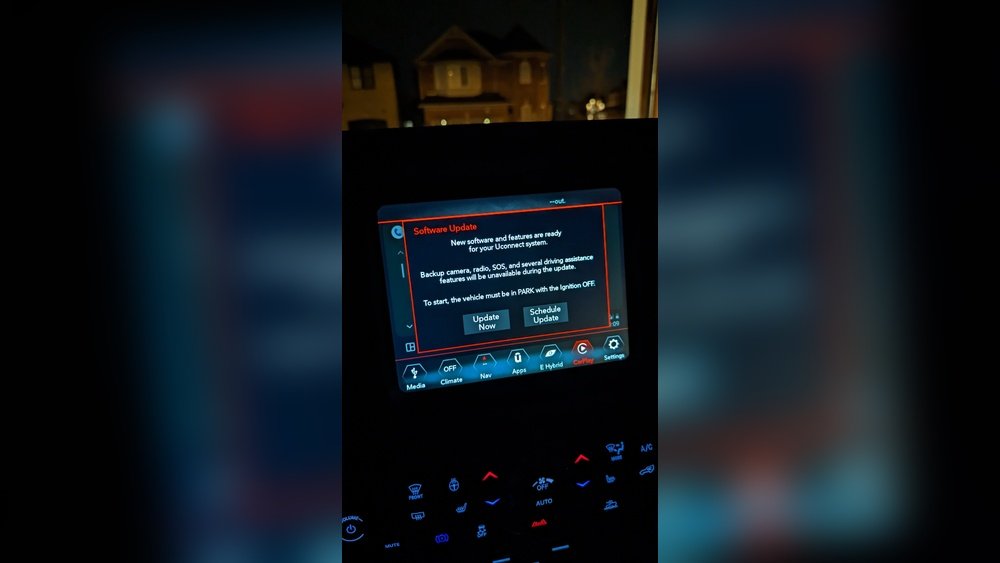
If you own a Jeep Wrangler, you know how important your Uconnect system is for navigation, entertainment, and staying connected on the road. But did you know that keeping your Uconnect updated can make your driving experience smoother and safer?
In this guide, you’ll learn exactly how to update your Uconnect system step-by-step. Whether you want the latest features, improved performance, or bug fixes, this simple process will help you get there fast. Keep reading to make sure your Jeep’s tech is always running at its best.

Credit: www.youtube.com
Preparing For The Update
Preparing your Jeep Wrangler’s Uconnect system for an update is important. This step helps ensure the process goes smoothly without problems. Taking a little time now can save frustration later.
Before starting the update, you need to do a few key tasks. These tasks include checking your current Uconnect version, gathering the tools you need, and backing up important data. Each step helps protect your system and data during the update.
Check Current Uconnect Version
First, find out which Uconnect version your Jeep currently uses. This helps confirm if an update is needed. You can check this in the Uconnect settings menu. Look for “System Information” or “About.” Write down the version number for reference.
Gather Necessary Tools
Next, collect all tools needed for the update. Most updates require a USB drive with enough free space. Make sure the USB is formatted to FAT32 or exFAT. A fully charged vehicle battery or engine running is also important to avoid interruptions.
Backup Important Data
Before updating, save any important data from your Uconnect system. This includes contacts, navigation favorites, and media files. Use the USB drive or a cloud service if available. Backing up protects your data from loss during the update.

Credit: www.youtube.com
Downloading The Update
Downloading the Uconnect update is the first step to keep your Jeep Wrangler’s system fresh. This process requires a computer and a USB drive. The update files come directly from the official Jeep source to ensure safety and compatibility.
Visit Official Jeep Uconnect Website
Start by opening your web browser. Go to the official Jeep Uconnect website. This site holds all the latest software updates. Avoid third-party websites to protect your vehicle’s system.
Select The Correct Model And Year
Find the section for software updates. Enter your Jeep Wrangler’s model and year. This step ensures you get the right files. Using incorrect files might cause system errors.
Download Update Files To Usb
Prepare a USB drive with enough space. Download the update files directly to this USB. Do not rename or change file locations. Safely eject the USB to avoid file corruption.
Installing The Update In Jeep Wrangler
Installing the update in your Jeep Wrangler’s Uconnect system is a simple process. It helps keep your system running smoothly and adds new features. Follow these steps carefully to update your vehicle without trouble.
Insert Usb Drive Into Vehicle
First, insert the USB drive with the update file into your Jeep’s USB port. This port is usually located near the center console. Make sure the USB drive contains the correct update file downloaded from the official Uconnect website.
Navigate Uconnect System Settings
Turn on your Jeep and access the Uconnect system on the touchscreen. Tap the “Settings” icon to open the menu. Look for the “System Updates” or “Software Update” option to start the update process.
Start The Update Process
Select the update option and follow the prompts on the screen. The system will detect the update on the USB drive. Confirm to begin installation. Do not turn off your vehicle or remove the USB drive during the update.
Troubleshooting Common Issues
If the update does not start, check the USB drive format. It should be FAT32 or exFAT. Restart your vehicle and try again. Ensure the update file is fully downloaded and saved correctly. If problems continue, visit the Jeep support site for help.
Post-update Tips
After updating your Jeep Wrangler’s Uconnect system, some steps help keep it working well. These post-update tips ensure the system runs smoothly and you enjoy any new features.
Verify Update Success
Check that the update installed correctly. Turn on your Uconnect system and look for the new version number in the settings menu. Make sure no error messages appear. Restart the system to confirm it runs without problems.
Explore New Features
Explore any new functions added by the update. Take time to test them while parked. This helps you understand how the system works and how new features can improve your drive.
Maintain System Performance
Keep your Uconnect system in good shape by cleaning the screen regularly. Avoid using harsh chemicals. Also, update your system periodically to fix bugs and improve security. This keeps the system fast and reliable.

Credit: infotainment.com
Frequently Asked Questions
How Do I Check My Jeep Wrangler Uconnect Version?
To check your Uconnect version, start your Jeep and tap the Uconnect screen. Go to Settings, then System Information. Your current software version will be displayed there. This helps you know if an update is needed for better features and performance.
Can I Update Uconnect Wirelessly In Jeep Wrangler?
Yes, many Jeep Wrangler models support wireless updates via Wi-Fi. Connect your vehicle to a strong Wi-Fi network. Then access the Uconnect settings to download and install the latest software updates automatically without needing a USB drive.
What If My Jeep Uconnect Update Fails?
If the update fails, try restarting your vehicle and reconnecting to Wi-Fi. Ensure your battery is fully charged. If issues persist, visit the Jeep dealer or use a USB update method from the official Uconnect website for a manual update.
How Often Should I Update Uconnect In Jeep Wrangler?
It’s best to check for Uconnect updates every few months. Regular updates improve system stability, add new features, and fix bugs. Staying updated ensures your Jeep Wrangler’s infotainment system works smoothly and securely.
Conclusion
Updating Uconnect in your Jeep Wrangler keeps your system running smoothly. It helps fix bugs and adds new features. The process is simple and does not take much time. Always use a strong internet connection to avoid interruptions. Regular updates ensure your Jeep stays up to date with the latest technology.
Take a few minutes to check for updates often. Your driving experience will stay safe and enjoyable. Easy steps lead to better performance. Stay connected and enjoy your Jeep fully.